KaleidoSwap Mutinynet · test funds only
QVAC × RGB Hackathon · Builder kit

Build on RGB, with AI agents that hold and move assets

Wallets you can use or fork, libraries to build your own, AI libraries for local agents, and live makers and faucets on Mutinynet.

How the pieces fit

Architecture docs ↗

Four layers. Use a wallet as-is, build on the libraries, put an AI on top, and test everything on Mutinynet.

Issue RGB assetsYour own token in one call
Send and receive on-chainRGB invoices, any wallet
Pay over LightningRGB assets in channels
Swap BTC ↔ USDT, XAUTAtomic, against our maker
Buy channelsInbound liquidity on demand
Run a local agentChat or voice, confirm before spend

Our wallets

Wallet docs ↗

Three KaleidoSwap wallets, each for a different surface. Two are open source and can be forked during the hackathon.

WalletPlatformBest forAIStatus
KaleidoSwap DesktopmacOS, Windows, LinuxRunning a node, trading, channelsChatOpen source · v0.5.1
RateAndroid, iOSMobile, multi-protocol, voiceChat + voiceOpen source · v0.4.0
Browser ExtensionChromiumWeb dApps via window.rgbNoneClosed beta · v0.3.0
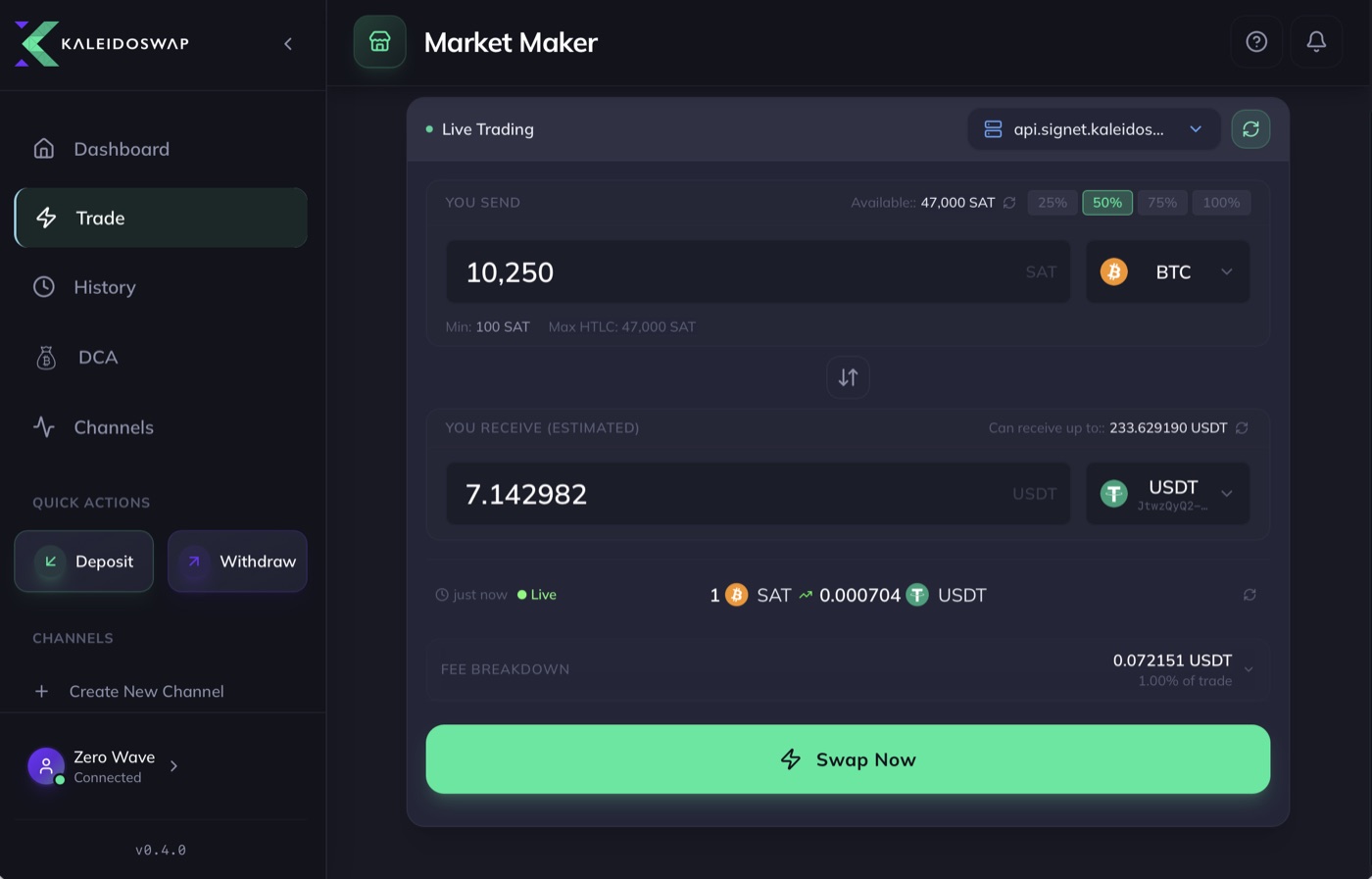
KaleidoSwap Desktop trade screen quoting 10,250 sats for 7.14 USDT on the signet maker
Open source · fork it

KaleidoSwap Desktop

v0.5.1 · macOS, Windows, Linux

A full RGB Lightning wallet that runs its own node.

Built-in RGB Lightning NodeSwapsBuy channelsDCALimit ordersRGB depositsKaleidoMind chat · QVAC
  • Easiest node: a funded RGB + Lightning node with a UI; point kaleido-mcp at it.
  • Model playground: chat with your node and try any GGUF model before wiring your app. From v0.6.0 the chat loads only the RGB node, channel, KaleidoSwap swap and portfolio skills, has a thinking on/off switch, and caps each reply (4,096 tokens by default).
  • Fork it: add a chat skill or a screen for your RGB use case.
Build from source
git clone https://github.com/kaleidoswap/desktop-app && cd desktop-app
pnpm install
pnpm run tauri:dev     # needs the Tauri prerequisites
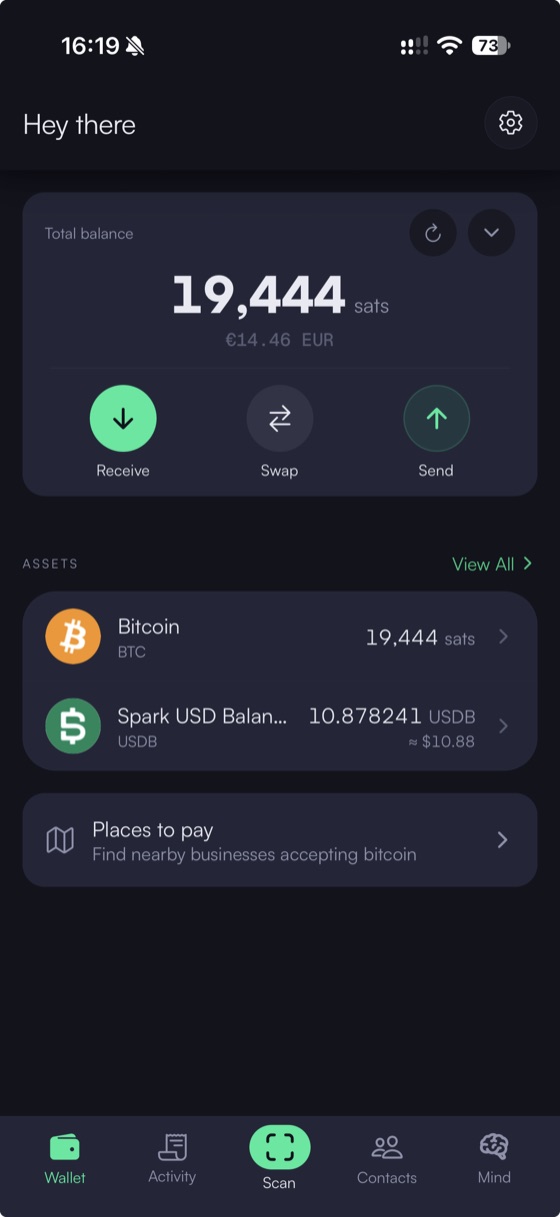
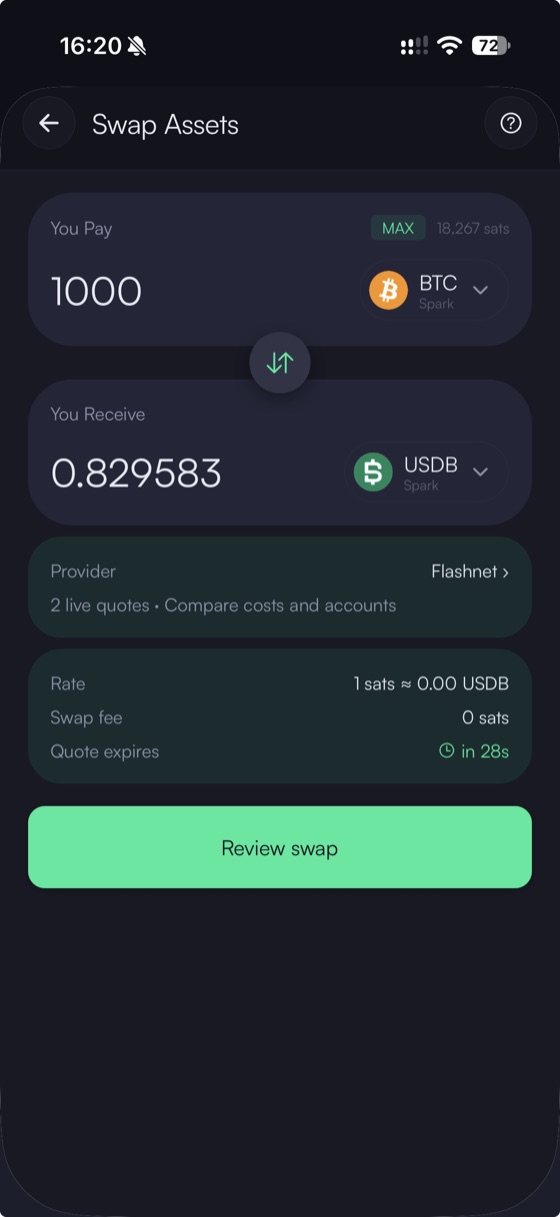
Rate home screen with BTC and Spark USD balancesRate swap screen quoting 1,000 sats to USDB with live provider quotes
Open source · fork it

Rate

v0.4.0 · Android, iOS

A mobile wallet with an AI assistant you can talk to, fully on the phone.

On-chain BTCRGBLightningSparkArkadeBarkVoice + chat agent · QVAC
  • Voice wallet: Qwen, Whisper and text-to-speech all run on-device, with a confirmation before any payment.
  • Add a skill: drop a skills/<name>/SKILL.md, run pnpm bundle-skills, and the assistant can use it.
  • Phone side of your demo: receive and send the assets your agent creates.
Build from source
git clone https://github.com/kaleidoswap/Rate && cd Rate
# follow the README Quick Start (Expo dev build, physical device)
pnpm bundle-skills     # after adding skills/<name>/SKILL.md
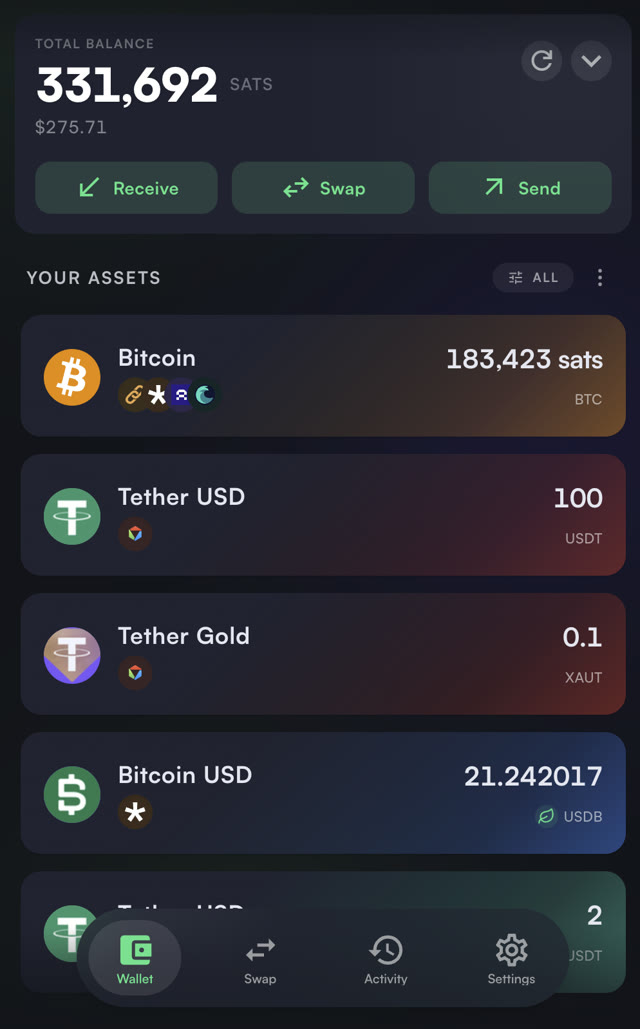
KaleidoSwap browser extension wallet holding BTC, USDT and XAUT on RGB, and USDB on Spark
Closed beta · use, don't modify

KaleidoSwap Browser Extension

v0.3.0 · Chromium

The wallet behind your web dApp.

window.rgbwindow.weblnRGB on-chain + LightningSparkArkadeBarkApproval popups
  • dApp wallet: build against the webrgb mock, then test end to end on localhost.
  • Pair it with your agent: the AI prepares the action, the popup is where the user approves it.
  • Get a build: ask the KaleidoSwap team at the venue for a beta invite.
Connect from a web page
const rgb = window.rgb;
await rgb.enable();
const info = await rgb.getInfo();

RGB libraries

SDK docs ↗

Build your own RGB wallet or app. Pick by where your keys live: in your app (rgb-lib), in a node (RGB Lightning Node), or in the user's wallet (webrgb).

Wallet core

Hold and move RGB assets yourself.

rgb-lib

Rust · bindings

The library behind most RGB wallets. Issue, receive and send RGB assets on-chain without dealing with Bitcoin or RGB internals. Works offline and watch-only.

Use it for an on-chain RGB wallet inside your own app.

npm i rgb-lib              # Node.js bindings
pip install rgb-lib        # Python

rgb-lib-wasm

npm · beta

rgb-lib compiled for the browser: IndexedDB storage, Esplora over HTTP, encrypted backups.

Use it for an RGB wallet that runs entirely in a web page or extension.

npm i @utexo/rgb-lib-wasm

RGB Lightning Node

Rust · Docker · REST

A Lightning node with RGB built in, controlled over a REST API. Holds RGB on-chain and in channels, pays and receives RGB invoices, runs atomic swaps.

Use it for RGB over Lightning, swaps, and as the backend for agents.

pipx install kaleido-cli   # or: pip install kaleido-cli
kaleido setup              # create + start a node on Mutinynet

Apps and dApps

Talk to a node, the DEX or a browser wallet.

kaleido-sdk

npm · PyPI

Typed clients for the KaleidoSwap maker (assets, quotes, swaps, channel orders) and the RGB Lightning Node API.

npm i kaleido-sdk          # or: pip install kaleido-sdk

webrgb

npm · 0.3.0

The window.rgb provider spec, with a mock wallet and a conformance suite. Build a web app without running a node, then plug in the extension.

npm i @kaleidorg/webrgb

AI libraries

AI tools docs ↗

Turn a wallet into something you can talk to. kaleido-mcp gives a model the tools; KaleidoMind runs the model on your device.

kaleido-mcp

npm · 0.4.5

An MCP server: exposes your RGB Lightning Node and the KaleidoSwap DEX as ~90 tools any AI app can call (balances, invoices, sends, issuance, channels, quotes, swaps, submarine swaps).

Use it for plugging a node into Claude, Cursor or your own agent.

npx -y kaleido-mcp

@kaleidorg/mind

npm · 0.10.11

KaleidoMind, the agent engine in our wallets. Runs QVAC models on-device (Node, Bare, React Native), uses MCP tools and skills, and pauses before every spend.

Use it for a fully local agent: chat, voice, or autonomous.

npm create @kaleidorg/mind my-agent   # starter project
npm i @kaleidorg/mind @qvac/sdk       # or add it to your app

Claude Code plugin

12 skills

Installs the KaleidoMind skills (RGB node, trading, channels, DCA, paid data…) and starts kaleido-mcp. Fastest way to poke at a node from your editor.

/plugin marketplace add kaleidoswap/kaleido-mind
/plugin install kaleido-mind@kaleidoswap

KaleidoAgent

reference app

A complete autonomous agent: portfolio rebalancing, DCA, channel health and a web dashboard. Read it for patterns or fork it.

Our infrastructure runs on Mutinynet. Everything below is live and free to use with test funds.

Mutinynet

Supported by KaleidoSwap BitcoinLightningRGB
RGB Lightning makerapi.signet.kaleidoswap.com

Buy Lightning channels (including RGB asset channels) and swap BTC ↔ USDT / XAUT atomically over Lightning. Channels · Swaps

On-chain swap makermaker.signet.kaleidoswap.com

Submarine swaps (on-chain → Lightning) and reverse swaps (Lightning → on-chain), to move funds without a channel of your own.

RGB faucetfaucet.mutinynet.kaleidoswap.comUSDT, XAUT · sign in with GitHub
RGB proxyrpcs://proxy.kaleidoswap.com/json-rpcor Iris: rpcs://proxy.iriswallet.com/0.2/json-rpc
30-second blocks: channels and swaps settle in minutes Stable signet: no testnet reorgs or block storms Working faucets for BTC and RGB Live makers: swaps work out of the box

Other networks: the node and libraries also run on regtest or other signets, but there you bring your own faucet and counterparty. KaleidoSwap makers and faucets live only on Mutinynet.

Example: an RGB agent end to end

15-minute tutorial ↗

Putting the pieces together: a node, test funds, kaleido-mcp, and a local model. Open the steps you need. No Docker? Jump to step 5 and use the mock node.

1

Get a node

The kaleido CLI, or the desktop wallet.

Run an RGB Lightning Node with the kaleido CLI (needs Docker and Python 3.11+), or use KaleidoSwap Desktop, which runs one for you.

pipx install kaleido-cli           # or: pip install kaleido-cli
export PATH="$HOME/.local/bin:$PATH"   # if kaleido is not found
kaleido setup                      # create + start one node
kaleido node init                  # once: set a password, write down the mnemonic
kaleido node unlock                # after every restart
kaleido wallet balance             # check it answers

The node API is on http://localhost:3001. If that port is taken, kaleido setup picks the next free one: kaleido node list shows it; use it as RLN_NODE_URL below.

2

Fund it

BTC, colorable UTXOs, RGB assets.
  • BTC from the Mutinynet faucet (sign in with GitHub, or pay a small Lightning invoice) to the address from kaleido wallet address.
  • Colorable UTXOs before receiving or issuing RGB: kaleido wallet create-utxos (or rln_create_utxos, or ask the agent).
  • USDT and XAUT from the RGB faucet (sign in with GitHub): use its RGB on-chain tab with an invoice from kaleido asset invoice <asset id>, taking the asset id from the faucet page. 100 USDT or 0.1 XAUT per claim, 5 claims a day. Its Lightning tab only works once you have a channel (step 3).
3

Buy a channel

Needed before any swap or Lightning payment.

Swaps settle over Lightning, so your node needs a channel with the KaleidoSwap LSP. Buy one after funding: the LSP opens it to you, optionally with USDT or XAUT on its side, and you pay a fee on-chain.

  • Size and cost: 50k to 1M sat, with up to 1,000 USDT or XAUT per channel. Tested on signet: a 54k-sat channel with 10 USDT inbound cost 7,281 sat in total and was usable about 4 minutes after payment.
  • Leave room to swap: a BTC→USDT swap must send the swap amount plus a 3,000-sat RGB payment minimum from your side of the channel. Set client_balance_sat to at least your largest swap + 6,000 sat, and fund your node with that much more on-chain. One payment is also capped at about 10% of the channel capacity, so the channel (lsp_balance_sat + client_balance_sat) must be at least 10 × (swap + 3,000 sat): 50,000 + 20,000 sat carries swaps up to about 4,000 sat. A channel with only 4,000 sat on your side cannot swap at all.
  • Step by step (kaleido-mcp tools): kaleidoswap_lsp_get_info → rln_connect_peer to the LSP → kaleidoswap_lsp_estimate_fees → kaleidoswap_lsp_create_order (with your client_pubkey from rln_get_node_info) → rln_send_btc of the order's amount_due_sat to payment.onchain.address → rln_list_channels until it is usable. Pay the order total, not only the fee.
  • With an agent: ask "I want to swap BTC for USDT but I have no channel. Buy me a channel from the KaleidoSwap LSP with 10 USDT inbound." It stops for your confirmation before paying.
  • In KaleidoSwap Desktop: Channels → Order New Channel.
  • Swap limits per trade: 0.000001 to 0.01 BTC, 0.5 to 1,000 USDT or XAUT. Allow a few blocks for the channel to open before you swap.
4

Connect an AI with kaleido-mcp

Claude Code, Claude Desktop or Cursor.

MCP is the standard way an AI app discovers and calls tools. You register kaleido-mcp once; the AI app starts it for you and you just chat.

Claude Code
claude mcp add kaleido -e RLN_NODE_URL=http://localhost:3001 -- npx -y kaleido-mcp
Claude Desktop, Cursor or any MCP client

Add to the client's MCP config (Claude Desktop: Settings → Developer → Edit Config), then restart it.

{
  "mcpServers": {
    "kaleido": {
      "command": "npx",
      "args": ["-y", "kaleido-mcp"],
      "env": { "RLN_NODE_URL": "http://localhost:3001" }
    }
  }
}

Check it: ask "What's my node info?". You should see a call to rln_get_node_info and your node's pubkey. RLN_NODE_URL is your node's API address.

5

Go local with KaleidoMind

Same agent, model on your machine.

The rgb-agent example runs a QVAC model, connects it to kaleido-mcp, loads the RGB node skill and asks three questions: balances, a 10 USDT invoice, then a 5 USDT send (only with RECIPIENT_INVOICE set). Edit steps in src/index.ts to ask your own.

npm create @kaleidorg/mind my-agent
cd my-agent && npm install
npm run start:offline  # fake node + scripted model: checks the setup, no download
npm run start:mock     # fake node, Qwen3.5 2B on-device (~1.3 GB, downloaded once)
npm run eval:mock      # 6 wallet tasks against the fake node
RLN_NODE_URL=http://localhost:3001 npm start   # your node via kaleido-mcp
> Which RGB assets do I hold, and what are the balances?
  tool rln_list_assets {}
You hold 1,000 USDT and 2 XAUT.

> Create an RGB invoice so I can receive 10 USDT.
  tool rln_create_rgb_invoice {"asset":"USDT","amount":10}
Here is your invoice: rgb:~/~/~/sig/…/10/utxob:…

> Send 5 USDT to this RGB invoice: rgb:…
  tool rln_send_asset {"asset":"USDT","amount":5,"to":"rgb:…"}
  Send 5 USDT to rgb:…. Confirm? [y/N]
6

Talk to it

Example requests and what comes back.

Same in an MCP client, the KaleidoMind example, or the AI chat in our wallets. Short, specific requests work best.

Which RGB assets do I hold, and what are the balances?
rln_list_assetsA list like "USDT: 100 spendable, XAUT: 0.5", each with its asset id.
Create 3 colorable UTXOs so I can receive RGB.
rln_create_utxosAsks you to confirm (it spends on-chain fees), then reports the UTXOs created.
Issue a token named Hackathon Coin, ticker HCK, supply 1,000,000.
rln_issue_assetAsks you to confirm, then returns the new asset id (rgb:…).
Create an RGB invoice to receive 10 HCK.
rln_create_rgb_invoiceAn rgb:… invoice string to share with the payer.
Quote 0.0005 BTC to USDT on KaleidoSwap.
kaleidoswap_get_quoteThe USDT you would receive, the fee and how long the quote is valid.
Pay this Lightning invoice: lntbs…
rln_pay_invoiceReads back the invoice and waits for your yes, then reports the payment status.

Which model?

  • Start with Qwen3.5 2B through QVAC. In our own informal runs it handled balances, issuance, invoices and quotes, and is fast enough for a live demo.
  • Go bigger (4B, 9B) if answers are sloppy and your machine has the memory; go smaller only for read-only questions.
  • Expect it to be slow on a laptop: tens of seconds to minutes per request.
An experiment, not a benchmark

These are notes from our own tests, not guarantees. Results change with hardware, prompts and model versions: measure on your setup. The starter loads Qwen3.5 2B by default; set MODEL to another @qvac/sdk model constant (e.g. QWEN3_5_4B_MULTIMODAL_Q4_K_M) to try others.

Good to know

  • Test funds only. Everything runs on Mutinynet. Never put a mainnet seed in an agent config.
  • Keep the confirmation gate on. Tools that move funds are flagged; KaleidoMind and the wallets ask before running them.
  • Colorable UTXOs first. If an RGB invoice or issuance fails, create UTXOs.
  • One wallet, one device. Never load the same rgb-lib or node mnemonic in two places: RGB assets can be lost.
  • Use asset ids, not tickers. Invoices and sends take the RGB asset id; list assets first.
  • Trust tool output, not the model. Only show invoices, addresses and ids that came back from a tool call.
Stuck?

Run the agent in mock mode to tell model problems from node problems, or try a bigger model. Check the KaleidoSwap docs (AI tools, SDK, CLI), open an issue on the repo, or find the KaleidoSwap team at the venue.